Skip to content
16 小时线上直播 · 可选班型 16-Hour Online Live Course · Flexible Formats

不要再问 AI Agent 是什么,直接看你学完能带走什么。 Stop asking what an AI Agent is. See what you can take away after the course.

搭上 AI 时代的快车 Get on the fast track of the AI era

老师线上直播带领实操,从零开始部署 AI Agent、定制 AI 数字员工、建立企业知识库,并完成企业网站和网站 AI 智能客服搭建。 Through live online hands-on teaching, you will deploy an AI Agent from scratch, customise an AI digital employee, build a company knowledge base, and complete a business website with a website AI customer-service assistant.

S$1,000

课程费用

Course Fee

S$500

UTAP 最高补贴

UTAP Subsidy Up To

16 Hours

线上直播实操

Online Live Practice

上课地点Venue

81 Anson Road, M Hotel, Level 8 Office #0815, Singapore 079908

授课语言Course Language

可选择中文授课或英文授课

Mandarin or English available
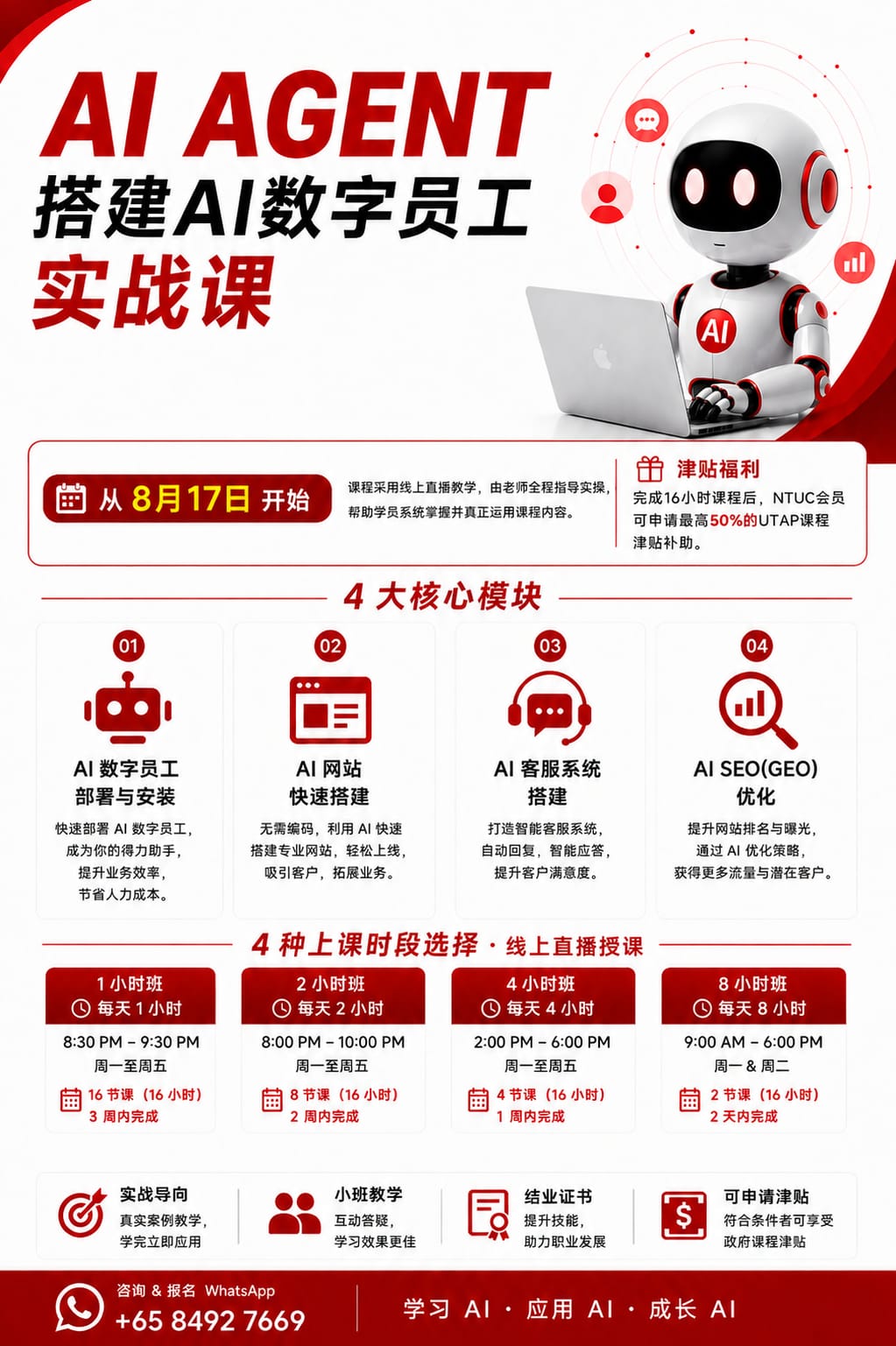
AI Agent 搭建 AI 数字员工实战课 AI Agent Digital Employee Practical Course

点击海报可放大 / 下载保存Click poster to enlarge / download

线上课程安排

Online Class Formats

同样 16 小时内容,按你的时间选择上课节奏。 The same 16-hour content, arranged around your schedule.

课程采用线上直播教学,老师全程带领实操。所有班型课程内容和总课时一致,学员可以根据自己的时间选择每天 1 小时、2 小时、4 小时或 8 小时完成。 The course is taught live online with guided practice. All formats cover the same content and total hours. Learners may choose 1, 2, 4, or 8 hours per day.

01

方案一|晚间轻松班Option 1 | Evening Lite

每天 1 小时

晚上 8:30–9:30

共 16 天

1 hour per day

8:30 PM–9:30 PM

16 days total

适合工作日白天较忙、想慢慢消化和持续练习的学员。For learners with busy daytime schedules who prefer steady practice.

02

方案二|晚间进阶班Option 2 | Evening Intensive

每天 2 小时

晚上 8:00–10:00

共 8 天

2 hours per day

8:00 PM–10:00 PM

8 days total

适合想保持晚上学习节奏,同时更快完成 16 小时课程的人。For learners who want evening classes and a faster completion pace.

03

方案三|全天集中班Option 3 | Full-Day Intensive

每天 8 小时

9:30–17:30

共 2 天

8 hours per day

9:30 AM–5:30 PM

2 days total

适合希望集中实操、快速完成阶段成果的学员。For learners who want focused practice and faster project progress.

04

方案四|两天密集班Option 4 | Two-Day Intensive

每天 8 小时

共 2 天

时间可根据学员安排

8 hours per day

2 days total

Schedule can be arranged

适合想在短时间内完成部署、网站和客服成果的人。For learners who want to complete deployment, website, and chatbot output quickly.

学完能带走什么

What You Take Away

不是一堆理论,而是一个真正能开始用的 AI 工作流程。 Not a pile of theory, but an AI workflow you can start using.

01

AI 数字员工部署AI Digital Employee Deployment

  • •搭建属于自己的 AI 助手
  • •用手机或电脑下达工作指令
  • •让 AI 协助整理资料、生成内容、支持日常工作
  • •Build your own AI assistant
  • •Give work instructions from mobile or laptop
  • •Use AI to organise information, generate content, and support daily work
02

AI 网站搭建AI Website Building

  • •用 AI 生成网站结构和页面大框架
  • •了解网站部署、域名、服务器的基础流程
  • •零基础也能完成一个可展示的网站雏形
  • •Generate website structure and page framework with AI
  • •Understand domain, server, and deployment basics
  • •Create a presentable website draft even with no technical background
03

网站小客服设置Website Mini Chatbot Setup

  • •设置网站小客服常见问题回复
  • •让客户先看到基础答案
  • •适合课程咨询、服务介绍、联系方式引导等场景
  • •Set up FAQ replies for a website mini chatbot
  • •Let visitors see basic answers first
  • •Useful for course enquiries, service introductions, and contact guidance
04

AI SEO 优化AI SEO Optimisation

  • •学习基础网站 SEO
  • •优化标题、关键词、页面内容
  • •让客户更容易通过搜索找到你的网站
  • •Learn basic website SEO
  • •Optimise page titles, keywords, and content
  • •Help customers find your website more easily through search
说明:本课程中的网站小客服是用于设置网站内常见问题回复,不是连接 WhatsApp、Facebook、Instagram 的全渠道客服。 Note: The website mini chatbot covered in this course is for FAQ replies on the website. It is not an omni-channel chatbot connected to WhatsApp, Facebook, or Instagram.

16 小时课程内容

16-Hour Curriculum

从认识 AI 到完成数字员工、知识库、网站和网站客服。 From AI fundamentals to a digital employee, knowledge base, website, and website chatbot.

学员无需编程基础。课程按小时拆分,老师会带领完成每个阶段的实操作业,让学习成果可以直接落到个人或企业业务里。 No coding background is required. Each hour has a clear hands-on output so the course can be applied to personal or business use.

阶段一|认识 AI Agent 与完成基础部署Stage 1 | Understand AI Agent and complete basic deployment

Stage 01
第1小时Hour 1

认识生成式 AIUnderstanding Generative AI

  • •什么是生成式 AI
  • •AI 可以完成哪些工作
  • •AI 在办公和企业经营中的应用
  • •常用 AI 工具及使用场景
  • •What generative AI is
  • •What AI can help complete
  • •AI use in office work and business operations
  • •Common AI tools and use cases

学习成果:了解 AI 的基本能力和应用范围。 Output: Understand the core capabilities and use cases of AI.

第2小时Hour 2

认识 AI Agent 与数字员工Understanding AI Agents and Digital Employees

  • •什么是 AI Agent
  • •AI Agent 与普通聊天工具的区别
  • •什么是 AI 数字员工
  • •行政、销售、营销和客服数字员工案例
  • •分析适合交给 AI 完成的工作
  • •What an AI Agent is
  • •How AI Agents differ from normal chat tools
  • •What an AI digital employee is
  • •Admin, sales, marketing, and customer-service examples
  • •Identify tasks suitable for AI

学习成果:完成《AI 数字员工需求分析表》。 Output: Complete an AI digital employee needs analysis.

第3小时Hour 3

部署 AI 数字员工Deploy an AI Digital Employee

  • •了解 AI Agent 的基础运行方式
  • •创建并启动自己的 AI 数字员工
  • •完成账号和基础环境设置
  • •认识主要功能和操作界面
  • •Understand how an AI Agent runs
  • •Create and start your own AI digital employee
  • •Set up accounts and basic environment
  • •Learn main features and interface

学习成果:完成 AI 数字员工的初步部署。 Output: Complete the initial deployment of your AI digital employee.

第4小时Hour 4

手机连接与安全设置Mobile Connection and Security Settings

  • •使用电脑向数字员工下达指令
  • •通过手机连接并使用 AI 数字员工
  • •文件及资料管理
  • •设置账号、访问权限与工作边界
  • •数据隐私和安全注意事项
  • •Give instructions from a computer
  • •Connect and use the AI digital employee from mobile
  • •Manage files and information
  • •Set account access and work boundaries
  • •Understand privacy and security precautions

学习成果:能够通过电脑或手机使用 AI 数字员工。 Output: Use your AI digital employee from computer or mobile.

阶段二|定制数字员工与训练工作指令Stage 2 | Customise the digital employee and train work instructions

Stage 02
第5小时Hour 5

定制数字员工身份Customise the Digital Employee Role

  • •为数字员工设定姓名和职业身份
  • •明确服务对象和核心职责
  • •设置沟通语言、语气和表达风格
  • •明确工作范围和角色边界
  • •Set the digital employee name and role
  • •Define target users and core responsibilities
  • •Set language, tone, and communication style
  • •Define work scope and role boundaries

学习成果:完成数字员工的基础角色设定。 Output: Complete the basic role setup for your digital employee.

第6小时Hour 6

编写系统提示词Write System Prompts

  • •什么是系统提示词
  • •系统提示词的基本结构
  • •写入企业背景、工作职责和服务标准
  • •设置输出格式和回答要求
  • •测试并优化系统提示词
  • •What a system prompt is
  • •Basic structure of a system prompt
  • •Add company background, duties, and service standards
  • •Set output format and response requirements
  • •Test and improve the system prompt

学习成果:完成一份《AI 数字员工角色说明书》。 Output: Complete an AI digital employee role brief.

第7小时Hour 7

学习下达工作指令Give Clear Work Instructions

  • •如何向 AI 提供任务背景
  • •明确任务目标和执行步骤
  • •设置输出格式及交付标准
  • •使用范例帮助 AI 理解要求
  • •将复杂工作拆分成多个步骤
  • •Provide task context to AI
  • •Define goals and execution steps
  • •Set output format and delivery standards
  • •Use examples to help AI understand requirements
  • •Break complex work into steps

学习成果:掌握向数字员工下达清晰指令的方法。 Output: Learn how to give clear instructions to your digital employee.

第8小时Hour 8

训练数字员工执行任务Train the Digital Employee to Execute Tasks

  • •建立标准工作流程
  • •设置禁止事项和工作边界
  • •设置需要人工确认的关键环节
  • •检查 AI 输出结果
  • •根据测试结果持续优化工作指令
  • •Create standard workflows
  • •Set restrictions and work boundaries
  • •Define key steps that need human confirmation
  • •Review AI output
  • •Improve instructions based on test results

学习成果:完成一套专属数字员工工作指令。 Output: Complete a set of customised digital employee work instructions.

阶段三|企业知识库与 AI 高效办公Stage 3 | Knowledge base and AI office productivity

Stage 03
第9小时Hour 9

规划企业知识库Plan a Company Knowledge Base

  • •什么是企业 AI 知识库
  • •确定需要放入知识库的资料
  • •整理公司、品牌、产品及服务信息
  • •整理价格、FAQ、SOP 和培训资料
  • •删除过期、重复及敏感内容
  • •What a company AI knowledge base is
  • •Decide which materials to include
  • •Organise company, brand, product, and service information
  • •Organise pricing, FAQ, SOP, and training materials
  • •Remove outdated, duplicated, or sensitive content

学习成果:完成企业知识库资料清单。 Output: Complete a company knowledge-base material list.

第10小时Hour 10

搭建企业知识库Build a Company Knowledge Base

  • •导入企业文件和业务资料
  • •设置知识库资料分类
  • •让 AI 根据指定资料回答问题
  • •减少错误回答及虚构信息
  • •测试、修改和更新知识库
  • •Import company files and business materials
  • •Set knowledge-base categories
  • •Let AI answer from specified materials
  • •Reduce incorrect or invented answers
  • •Test, edit, and update the knowledge base

学习成果:完成个人或企业专属知识库。 Output: Complete a personal or company knowledge base.

第11小时Hour 11

AI 文案与办公应用AI Copywriting and Office Applications

  • •使用 AI 撰写邮件、通知和工作文案
  • •生成营销文案及客户回复
  • •总结长篇文件和复杂资料
  • •调整内容的语言、语气和格式
  • •制作可重复使用的提示词
  • •Use AI to write emails, notices, and work content
  • •Generate marketing copy and customer replies
  • •Summarise long documents and complex materials
  • •Adjust language, tone, and format
  • •Create reusable prompts

学习成果:完成一套常用办公及文案提示词。 Output: Complete a set of common office and copywriting prompts.

第12小时Hour 12

AI 会议、报告与 PPTAI Meeting Notes, Reports, and Slides

  • •整理会议记录和生成会议纪要
  • •提取重点、任务和负责人
  • •快速生成工作报告
  • •制作 PPT 结构和演讲大纲
  • •辅助整理表格及分析基础数据
  • •Organise meeting records and generate minutes
  • •Extract key points, tasks, and owners
  • •Quickly generate work reports
  • •Create slide structures and presentation outlines
  • •Assist with spreadsheets and basic data analysis

学习成果:完成一份会议纪要、报告或 PPT 大纲。 Output: Complete a meeting summary, report, or slide outline.

阶段四|企业网站与网站 AI 智能客服Stage 4 | Business website and website AI customer service

Stage 04
第13小时Hour 13

规划企业网站Plan a Business Website

  • •明确网站目标和目标客户
  • •确定品牌定位及网站风格
  • •规划网站栏目和页面结构
  • •准备企业介绍、服务和联系资料
  • •设计网站访客的浏览与咨询路径
  • •Define website goals and target customers
  • •Set brand positioning and website style
  • •Plan sections and page structure
  • •Prepare company, service, and contact information
  • •Design the visitor journey and enquiry path

学习成果:完成企业网站结构及内容规划。 Output: Complete website structure and content planning.

第14小时Hour 14

用 AI 搭建企业网站Build a Business Website with AI

  • •使用 AI 生成网站首页
  • •制作公司介绍及产品服务页面
  • •生成和优化网站文案
  • •设置图片、颜色及视觉风格
  • •添加电话、WhatsApp 和咨询入口
  • •预览、测试及修改网站
  • •Use AI to generate a homepage
  • •Create company profile and product or service pages
  • •Generate and improve website copy
  • •Set images, colours, and visual style
  • •Add phone, WhatsApp, and enquiry entry points
  • •Preview, test, and edit the website

学习成果:完成一个可展示的企业网站基础版本。 Output: Complete a presentable basic business website.

第15小时Hour 15

搭建网站 AI 智能客服Build a Website AI Customer-Service Assistant

  • •设置 AI 客服的身份、职责和服务语气
  • •设计欢迎语和常见问题
  • •将 AI 客服连接至企业知识库
  • •根据客户语言进行多语言回复
  • •设置回答范围和禁止事项
  • •Set the AI customer-service role, duties, and tone
  • •Design greeting messages and FAQs
  • •Connect the AI assistant to the company knowledge base
  • •Reply in multiple languages based on customer language
  • •Set response scope and restrictions

学习成果:完成网站 AI 客服的基础搭建。 Output: Complete the basic setup of a website AI customer-service assistant.

第16小时Hour 16

客服测试与课程成果展示Chatbot Testing and Course Output Showcase

  • •收集客户姓名、电话和具体需求
  • •设置咨询及预约信息收集
  • •设置复杂问题的人工转接
  • •测试并优化客服回答
  • •检查数字员工、知识库、网站及客服
  • •展示个人课程成果并进行优化
  • •Collect customer name, phone, and specific needs
  • •Set enquiry and appointment information collection
  • •Set human handover for complex questions
  • •Test and improve chatbot answers
  • •Check digital employee, knowledge base, website, and chatbot
  • •Present and optimise individual course output

学习成果:完成一个能够回答客户问题并收集咨询信息的网站 AI 智能客服。 Output: Complete a website AI assistant that answers customer questions and collects enquiry information.

学完带走

Takeaways

把“我想学 AI”变成“我已经有一个工作流”。 Turn “I want to learn AI” into “I have a working process”.

一个属于自己的 AI 数字员工Your own AI digital employee

完成基础部署、身份设定和使用方式配置。Complete basic deployment, role setup, and usage settings.

一份 AI 数字员工需求分析表AI digital employee needs analysis

梳理哪些工作适合交给 AI 协助完成。Identify which tasks can be supported by AI.

一套角色及系统提示词Role and system prompt set

让数字员工有明确职责、语气、边界和输出格式。Define clear responsibilities, tone, boundaries, and output format.

一套标准工作指令Standard work instructions

把复杂任务拆成 AI 能执行的清晰步骤。Break complex tasks into clear steps AI can follow.

一个个人或企业知识库A personal or company knowledge base

把公司、服务、FAQ、SOP 等资料整理给 AI 使用。Organise company, service, FAQ, and SOP information for AI use.

一套 AI 高效办公提示词AI office productivity prompt templates

用于邮件、报告、会议纪要、PPT 和日常文案。For emails, reports, meeting notes, slides, and daily content.

一个企业网站基础版本A basic business website version

完成可展示的网站结构、页面和核心内容。Build a presentable website structure, pages, and core content.

一个网站 AI 智能客服A website AI customer-service assistant

可回答基础问题并收集客户咨询信息。Answer basic questions and collect customer enquiry information.

适合人群

Who It Is For

适合想把 AI 接进业务的人。 For people who want AI inside real business work.

课程适合零基础或初级学员,重点是实操和落地。

The course is beginner-friendly and focused on practical implementation.

企业老板
销售人员
客服团队
市场营销人员
想学习 AI Agent 实战应用的职场人
想为自己或公司搭建 AI 工具的人
Business owners
Sales professionals
Customer-service teams
Marketing teams
Working professionals who want practical AI Agent skills
Anyone who wants to build AI tools for themselves or their company

准备把 AI 变成你的数字员工? Ready to turn AI into your digital employee?

16 小时线上直播实操,可选择中文或英文授课,也可按 1 小时、2 小时、4 小时或 8 小时班型安排。NTUC 会员符合条件者,课后可自行申请最高 S$500 UTAP 补贴。 16-hour online live hands-on training, available in Mandarin or English, with 1-hour, 2-hour, 4-hour, or 8-hour daily formats. Eligible NTUC members may self-apply for up to S$500 UTAP subsidy after completing the course.